Ctrl/




The AI-driven editor for documents, presentations, and more.
Updated: Sep 16, 2025 Free + from $20/month
Description
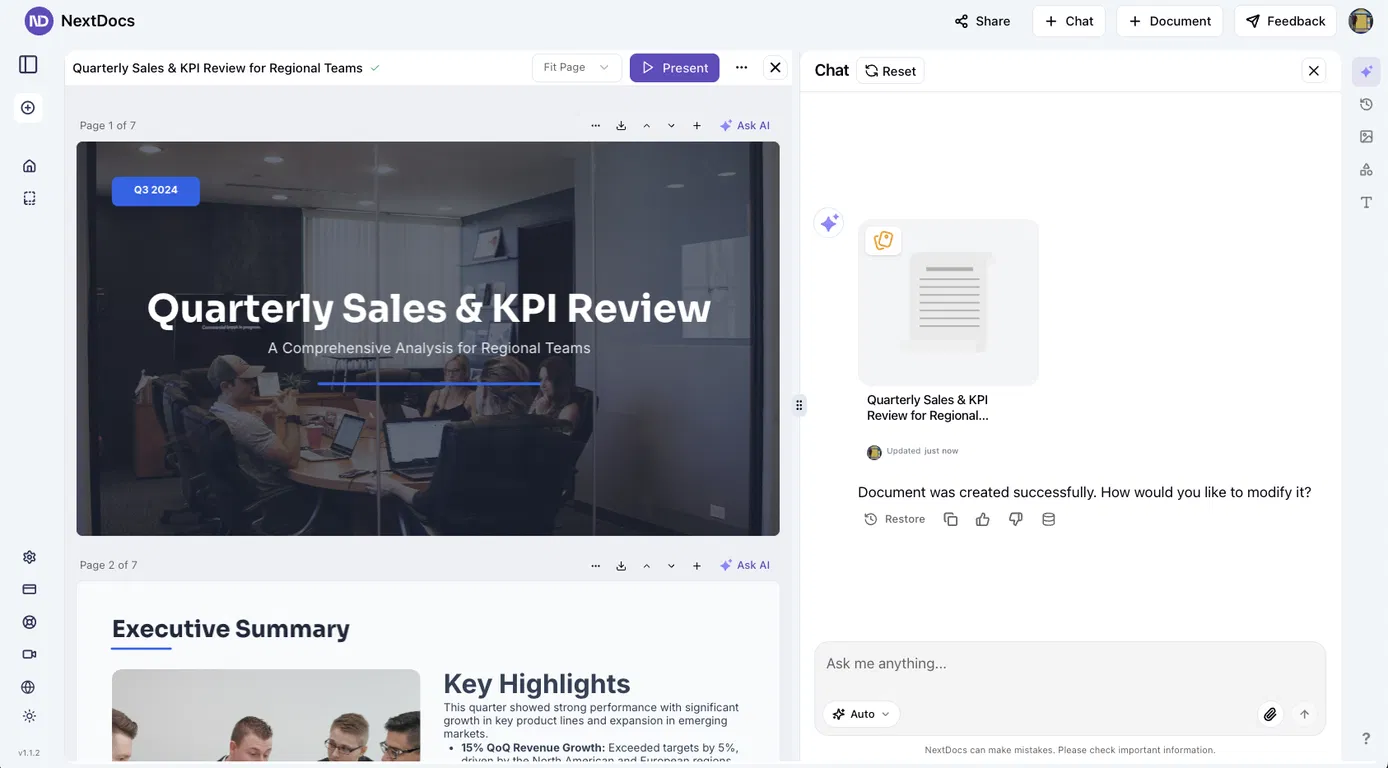
NextDocs is a document generator powered by AI that turns simple instructions into refined reports, proposals, resumes, and presentations in moments. Whether you're composing a strategic business plan, developing a sales proposal, or creating a marketing campaign brief, NextDocs streamlines the process by converting ideas into professional-grade documents with speed and accuracy.
The platform accommodates several document types, including slideshows, structured reports, continuous docs, and even websites (launching soon). With its simple workflow and compatibility for advanced models like Gemini 2.5 Flash, NextDocs helps professionals, teams, and companies produce executive-ready materials without the effort of formatting or extensive writing. It’s a comprehensive tool for those looking to save time while maintaining quality in internal or external documents.
The platform accommodates several document types, including slideshows, structured reports, continuous docs, and even websites (launching soon). With its simple workflow and compatibility for advanced models like Gemini 2.5 Flash, NextDocs helps professionals, teams, and companies produce executive-ready materials without the effort of formatting or extensive writing. It’s a comprehensive tool for those looking to save time while maintaining quality in internal or external documents.
Pricing Plans
Model
freemium
Packages
1 Package
Price Start From
$20/month
Payment Model
monthly
Model
freemium
Packages
1 Package
Price Start From
$20/month
Payment Model
monthly
Releases
NextDocs v1.4.8 – Generate beautiful docs and slides directly from ChatGPT and Claude via our MCP Integration
Released: January 2026
Create presentations and documents directly from Claude and ChatGPT. Connect NextDocs as an MCP server, describe what you need, and get professionally designed results — complete with AI-generated themes and multiple design variants.
No more copy-pasting. Just describe and create.
---
MCP Integration
NextDocs now works as an MCP (Model Context Protocol) server, letting you create documents directly from your favorite AI assistants:
- Works with Claude (desktop, web, and API)
- Works with ChatGPT (via Apps SDK)
- OAuth 2.0 authentication for secure access
To try it, add this server URL in your AI assistant's settings:
https://mcp.nextdocs.io/mcp
---
Available Tools
NextDocs MCP provides three tools:
create_presentation
Creates canvas-based slide presentations. Perfect for pitch decks, sales presentations, training materials, and visual storytelling.
create_document
Creates professional documents — either canvas-based (fixed pages) or pageless (continuous flow). Great for resumes, proposals, reports, and whitepapers.
hello
A simple connectivity test that returns a greeting. Use it to verify your connection is working before creating documents.
---
Key Features
Multi-Variant Generation
Generate 2-4 design variations simultaneously. Each variant has different structure, visual direction, and layout approach. Compare side-by-side and pick your favorite.
AI-Generated Themes
Set theme_mode to auto (default) and NextDocs analyzes your prompt to generate custom color themes that match your content. A presentation about Ocean Conservation might get Deep Sea Blue, Aquatic Teal, or Marine Green themes.
Fast vs Quality Models
- fast (default): Optimized for quick generation, typically under a minute
- quality: More powerful models for complex content, better for detailed topics
Canvas vs Pageless Documents
- Canvas: Page-based with fixed dimensions, perfect for presentations and PDF exports
- Pageless: Continuous flow without page breaks, ideal for long-form content and articles
---
How to Connect
Claude:
1. Go to Settings → Connectors
2. Click Add Custom Connector
3. Enter server URL: https://mcp.nextdocs.io/mcp
4. Authorize with your NextDocs account
5. Start creating from any Claude conversation
ChatGPT:
1. Go to Settings and add a custom MCP connector
2. Enter server URL: https://mcp.nextdocs.io/mcp
3. Authorize with your NextDocs account
4. Start creating
---
Example Prompts
Sales Presentation:
Create a 10-slide sales presentation for a B2B SaaS product called 'DataFlow' that helps companies automate their data pipelines. Include slides for: problem statement, solution overview, key features, pricing tiers, customer testimonials placeholder, and a call to action.
Project Proposal:
Create a project proposal document for renovating a historic downtown building into a mixed-use development. Include sections for executive summary, project scope, timeline, budget overview, and risk assessment.
Quick Document:
Create a pageless document outlining the benefits of remote work for a company internal memo. Keep it concise — about 3-4 main points with brief explanations.
---
What You Get Back
When NextDocs creates your document, you receive:
- A direct link to view and edit in NextDocs
- Document details (title, type, page count)
- Variant selection if you generated multiple copies
- Full editing capabilities in NextDocs
- Export to PDF, PowerPoint, Google Slides, or images
---
Tips for Best Results
Be Specific:
Make a presentation about marketing → Less optimal
Create an 8-slide presentation about digital marketing strategies for small e-commerce businesses. Include slides on SEO, social media, email marketing, and paid advertising. → Better
Choose the Right Variants:
- 1 variant: When you know exactly what you want
- 2 variants (default): Good balance for A/B selection
- 3-4 variants: When exploring creative directions
---
Privacy & Security
- OAuth 2.0 for secure authentication
- Documents stored in your NextDocs account
- No conversation history stored from Claude or ChatGPT
- Disconnect anytime from your AI assistant's settings
---
What's New in v1.4.8
- MCP server integration for Claude and ChatGPT
- OAuth 2.0 authentication flow
- create_presentation and create_document tools
- Multi-variant generation from AI assistants
- AI-generated themes based on prompt analysis
- Fast and quality model options
---
Try It Now
Add the server URL to your AI assistant:
https://mcp.nextdocs.io/mcp
Full setup guide:
https://nextdocs.io/en/blogs/introducing-nextdocs-mcp-create-slides-from-claude-chatgpt
Questions or feedback? [email protected]
---
Your ideas. Your AI assistant. Beautiful results.
— The NextDocs Team
Released: January 2026
Create presentations and documents directly from Claude and ChatGPT. Connect NextDocs as an MCP server, describe what you need, and get professionally designed results — complete with AI-generated themes and multiple design variants.
No more copy-pasting. Just describe and create.
---
MCP Integration
NextDocs now works as an MCP (Model Context Protocol) server, letting you create documents directly from your favorite AI assistants:
- Works with Claude (desktop, web, and API)
- Works with ChatGPT (via Apps SDK)
- OAuth 2.0 authentication for secure access
To try it, add this server URL in your AI assistant's settings:
https://mcp.nextdocs.io/mcp
---
Available Tools
NextDocs MCP provides three tools:
create_presentation
Creates canvas-based slide presentations. Perfect for pitch decks, sales presentations, training materials, and visual storytelling.
create_document
Creates professional documents — either canvas-based (fixed pages) or pageless (continuous flow). Great for resumes, proposals, reports, and whitepapers.
hello
A simple connectivity test that returns a greeting. Use it to verify your connection is working before creating documents.
---
Key Features
Multi-Variant Generation
Generate 2-4 design variations simultaneously. Each variant has different structure, visual direction, and layout approach. Compare side-by-side and pick your favorite.
AI-Generated Themes
Set theme_mode to auto (default) and NextDocs analyzes your prompt to generate custom color themes that match your content. A presentation about Ocean Conservation might get Deep Sea Blue, Aquatic Teal, or Marine Green themes.
Fast vs Quality Models
- fast (default): Optimized for quick generation, typically under a minute
- quality: More powerful models for complex content, better for detailed topics
Canvas vs Pageless Documents
- Canvas: Page-based with fixed dimensions, perfect for presentations and PDF exports
- Pageless: Continuous flow without page breaks, ideal for long-form content and articles
---
How to Connect
Claude:
1. Go to Settings → Connectors
2. Click Add Custom Connector
3. Enter server URL: https://mcp.nextdocs.io/mcp
4. Authorize with your NextDocs account
5. Start creating from any Claude conversation
ChatGPT:
1. Go to Settings and add a custom MCP connector
2. Enter server URL: https://mcp.nextdocs.io/mcp
3. Authorize with your NextDocs account
4. Start creating
---
Example Prompts
Sales Presentation:
Create a 10-slide sales presentation for a B2B SaaS product called 'DataFlow' that helps companies automate their data pipelines. Include slides for: problem statement, solution overview, key features, pricing tiers, customer testimonials placeholder, and a call to action.
Project Proposal:
Create a project proposal document for renovating a historic downtown building into a mixed-use development. Include sections for executive summary, project scope, timeline, budget overview, and risk assessment.
Quick Document:
Create a pageless document outlining the benefits of remote work for a company internal memo. Keep it concise — about 3-4 main points with brief explanations.
---
What You Get Back
When NextDocs creates your document, you receive:
- A direct link to view and edit in NextDocs
- Document details (title, type, page count)
- Variant selection if you generated multiple copies
- Full editing capabilities in NextDocs
- Export to PDF, PowerPoint, Google Slides, or images
---
Tips for Best Results
Be Specific:
Make a presentation about marketing → Less optimal
Create an 8-slide presentation about digital marketing strategies for small e-commerce businesses. Include slides on SEO, social media, email marketing, and paid advertising. → Better
Choose the Right Variants:
- 1 variant: When you know exactly what you want
- 2 variants (default): Good balance for A/B selection
- 3-4 variants: When exploring creative directions
---
Privacy & Security
- OAuth 2.0 for secure authentication
- Documents stored in your NextDocs account
- No conversation history stored from Claude or ChatGPT
- Disconnect anytime from your AI assistant's settings
---
What's New in v1.4.8
- MCP server integration for Claude and ChatGPT
- OAuth 2.0 authentication flow
- create_presentation and create_document tools
- Multi-variant generation from AI assistants
- AI-generated themes based on prompt analysis
- Fast and quality model options
---
Try It Now
Add the server URL to your AI assistant:
https://mcp.nextdocs.io/mcp
Full setup guide:
https://nextdocs.io/en/blogs/introducing-nextdocs-mcp-create-slides-from-claude-chatgpt
Questions or feedback? [email protected]
---
Your ideas. Your AI assistant. Beautiful results.
— The NextDocs Team
Reviews
Pros & Cons
Pros
Produces refined documents and presentations quickly from simple requests
Works with multiple formats such as presentations, reports, and resumes
AI-enhanced accuracy ensures clear and professional results
Cons
Generation speeds can vary
Presently restricted to a limited set of key document types
Relies on AI prompts; output quality can differ depending on prompt clarity