Ctrl/




Your AI Studio designed to boost productivity with features for file management, development, and automated tasks.
Input:
Output:
Updated: Mar 7, 2025 Free + from $49
Description
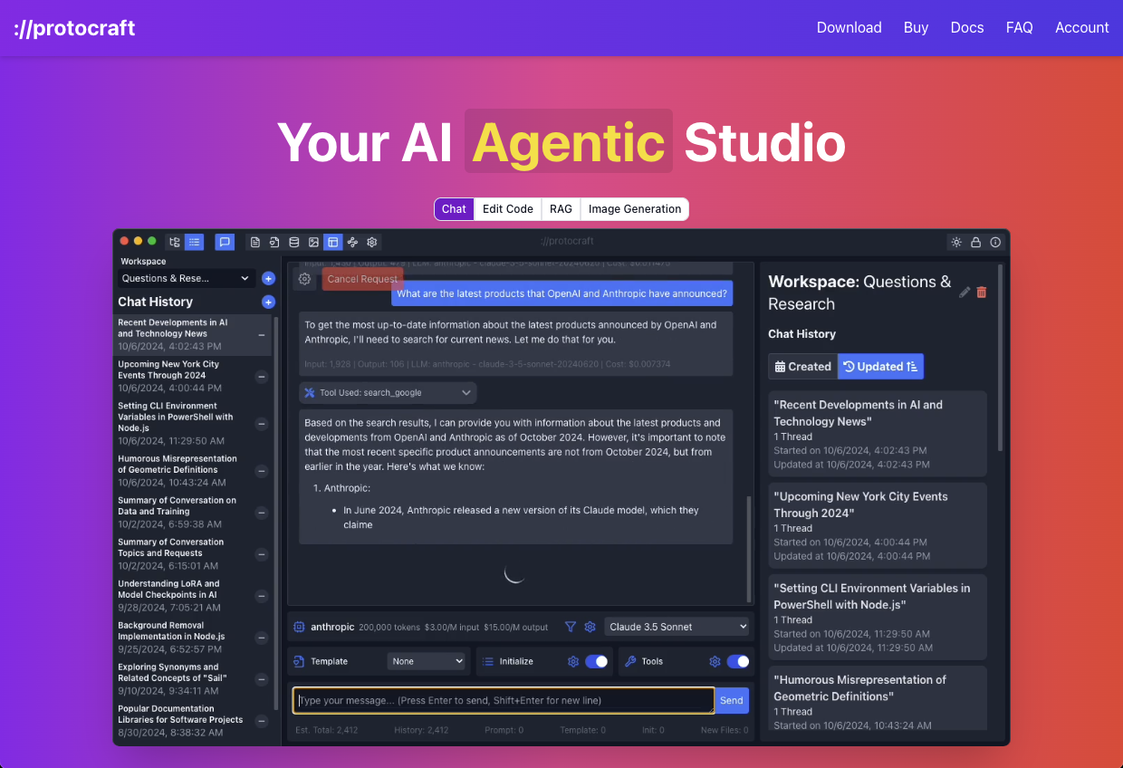
Protocraft is an AI-powered digital studio designed to help with file editing, image analysis, software development, and prompt automation. The application is compatible with Windows, Mac, and Linux, and it supports OpenAI, Anthropic, OpenRouter, Google, Venice AI, and your own local LLMs.
Protocraft enables smooth file and code generation and editing, which helps to streamline software development. It can also serve as a general chat agent for editing files and spreadsheets, as well as for interacting with long documents.
Besides browsing, creating, and editing files, Protocraft includes tools and vision support that allows you to drop in images and request that it create or modify files based on their content.
The tool distinguishes itself through its unique combination of prompt automation and software development assistance, which makes it highly valuable to developers who prioritize efficiency and simplicity.
As a desktop AI tool, it offers easy access and works with numerous LLM providers, which provides strong functionality and many possibilities.
Protocraft enables smooth file and code generation and editing, which helps to streamline software development. It can also serve as a general chat agent for editing files and spreadsheets, as well as for interacting with long documents.
Besides browsing, creating, and editing files, Protocraft includes tools and vision support that allows you to drop in images and request that it create or modify files based on their content.
The tool distinguishes itself through its unique combination of prompt automation and software development assistance, which makes it highly valuable to developers who prioritize efficiency and simplicity.
As a desktop AI tool, it offers easy access and works with numerous LLM providers, which provides strong functionality and many possibilities.
Key Features
Coding
Images
Use Ollama Via Api
Unlimited Images & Messages
Use Automatic1111 Via Api
Pricing Plans
Model
freemium
Packages
1 Package
Price Start From
$49
Payment Model
Not specified
Model
freemium
Packages
1 Package
Price Start From
$49
Payment Model
Not specified
Releases
- PDFs and EPubs can now be used directly within chat windows.
- Chat windows now support sound files (requires transcription).
- Transcription Data Table has replaced Transcription Grid to improve UX.
- Implemented Microsoft/Windows Certificate Signing for Application Builds.
- Added official signing support for Windows applications.
- Added OpenAI GPT 4.5 support.
Improvements:
- Persist states are maintained when switching between secondary screens.
- Automatically reload file content when switching tabs or to the file browser.
- Directory listings to LLM are now more consistent and handle large directories more effectively.
- Basic Tools (Files, Internet) are now enabled by default in new workspaces.
Fixes:
- Fixed folder opening/closing issues that occurred with duplicate names.
- Cleaned up the in-progress message indicator.
- Fixed duplicate transcription records.
- Optimized transcription to only process non-text files.
Reviews
Pros & Cons
Pros
Software development assistant
Prompt automation
Works with LLM APIs
Cons
Only a desktop application
Requires JavaScript
Dependent on LLM APIs