Ctrl/




A voice-driven Notion assistant that boosts productivity on the go.
Input:
Output:
Updated: Jul 3, 2025 Free + from $20/month
Description
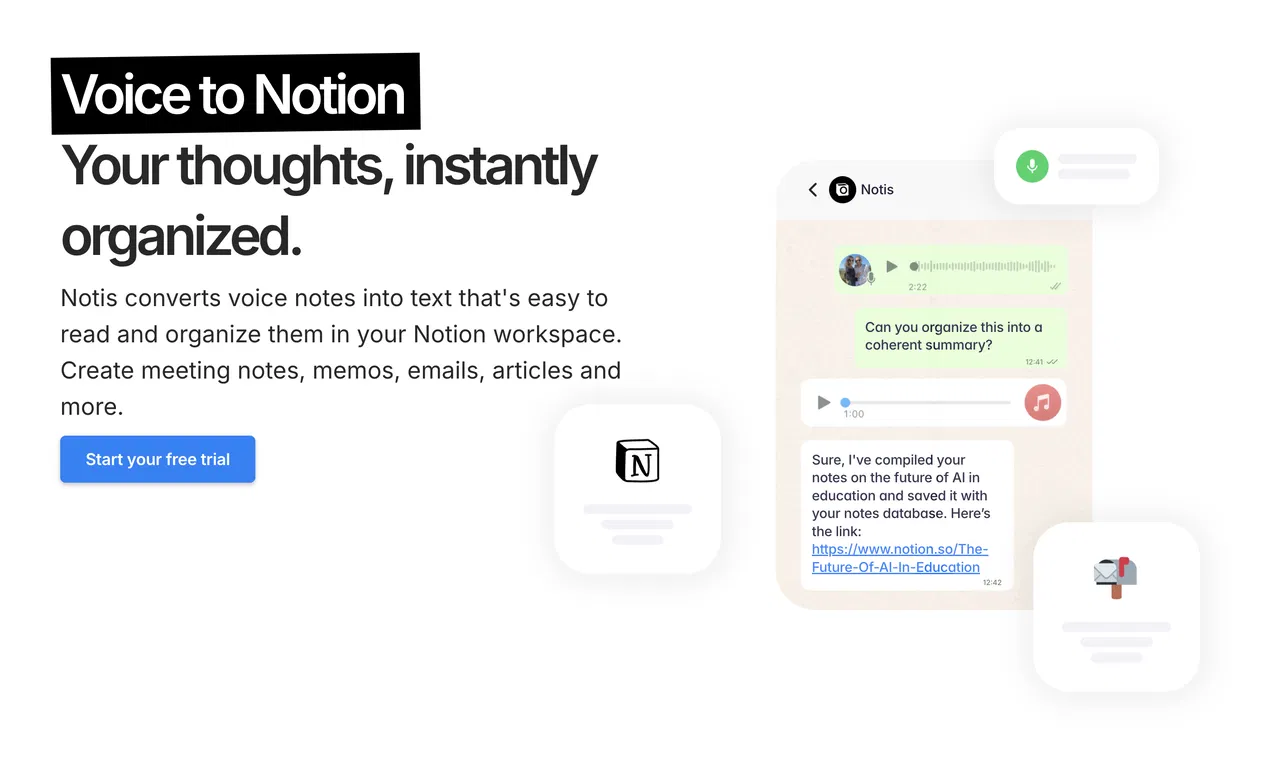
Notis is a voice-controlled assistant for Notion.
It transforms voice notes into readable text and organizes them within your Notion workspace. Use it to create meeting summaries, memos, emails, articles, and more. Designed for busy individuals, it enables work even when away from a desk. Notis converts any Notion database into its own AI agent.
Think of Notis as an intern with access to your Notion workspace, ready to take on tasks delegated via WhatsApp, Telegram voice messages, or email.
Here are some potential uses:
• Record and organize your thoughts; Notis will summarize and refine them. For example: "Notis, capture my thoughts on the new marketing strategy and organize them into bullet points."
• Record meetings and have Notis draft the minutes and send them to your email. For example: "Notis, transcribe this product meeting and email me a summary."
• Keep track of tasks and to-dos, organized by area, project, or location. Ask Notis what tasks you can complete at home or what's left on a specific project with a deadline. For example: "Notis, what tasks are due next Tuesday for the website redesign project?"
• Transcribe and correctly store business cards, expenses, and other items. Notis understands your Notion database and can edit fields. For example: "Notis, save this receipt as a marketing expense."
• Find information in Notion and query databases. For example: "What tool converted articles to podcasts?" or "How much did I spend on restaurants during my last business trip?". For example: "Notis, find my notes from last month's meetings about project management tools."
• Set recurring notifications on WhatsApp or Telegram for reminders. For example: "Notis, remind me to review weekly goals every Monday at 9 AM."
• Create automated tasks for Notis to perform regularly. For example: "Notis, email me a summary of completed tasks every Friday at 5 PM."
• Use Perplexity Deep Search to combine web information with your Notion knowledge. For example: "Notis, do a deep search on productivity apps for remote teams and save the results to my Tools database."
• Chat with documents by uploading them to WhatsApp or Telegram. For example: "Notis, analyze this contract PDF and highlight key terms."
Forward items to [email protected] for Notis to organize. For example, forward candidate applications for Notis to organize in your scouting database, filtered by criteria.
Notis offers a comprehensive second-brain Notion template but also works with any Notion templates or databases. Create custom workflows with voice, text, and images in Notion—no coding required, just an AI intern.
It transforms voice notes into readable text and organizes them within your Notion workspace. Use it to create meeting summaries, memos, emails, articles, and more. Designed for busy individuals, it enables work even when away from a desk. Notis converts any Notion database into its own AI agent.
Think of Notis as an intern with access to your Notion workspace, ready to take on tasks delegated via WhatsApp, Telegram voice messages, or email.
Here are some potential uses:
• Record and organize your thoughts; Notis will summarize and refine them. For example: "Notis, capture my thoughts on the new marketing strategy and organize them into bullet points."
• Record meetings and have Notis draft the minutes and send them to your email. For example: "Notis, transcribe this product meeting and email me a summary."
• Keep track of tasks and to-dos, organized by area, project, or location. Ask Notis what tasks you can complete at home or what's left on a specific project with a deadline. For example: "Notis, what tasks are due next Tuesday for the website redesign project?"
• Transcribe and correctly store business cards, expenses, and other items. Notis understands your Notion database and can edit fields. For example: "Notis, save this receipt as a marketing expense."
• Find information in Notion and query databases. For example: "What tool converted articles to podcasts?" or "How much did I spend on restaurants during my last business trip?". For example: "Notis, find my notes from last month's meetings about project management tools."
• Set recurring notifications on WhatsApp or Telegram for reminders. For example: "Notis, remind me to review weekly goals every Monday at 9 AM."
• Create automated tasks for Notis to perform regularly. For example: "Notis, email me a summary of completed tasks every Friday at 5 PM."
• Use Perplexity Deep Search to combine web information with your Notion knowledge. For example: "Notis, do a deep search on productivity apps for remote teams and save the results to my Tools database."
• Chat with documents by uploading them to WhatsApp or Telegram. For example: "Notis, analyze this contract PDF and highlight key terms."
Forward items to [email protected] for Notis to organize. For example, forward candidate applications for Notis to organize in your scouting database, filtered by criteria.
Notis offers a comprehensive second-brain Notion template but also works with any Notion templates or databases. Create custom workflows with voice, text, and images in Notion—no coding required, just an AI intern.
Key Features
Transcribe meetings and voice notes
Produce writing in your style
Integrate with Notion
Communicate in 56 languages
Receive reminders on WhatsApp
Pricing Plans
Model
freemium
Packages
1 Package
Price Start From
$20/month
Payment Model
Not specified
Model
freemium
Packages
1 Package
Price Start From
$20/month
Payment Model
Not specified
Releases
Hi there 👋
Flo here with the monthly update.
Did you miss last month's update? Me too! 🤣
I'll try my best to send these every month, so stick with me. We have a lot to catch up on since early May.
📸 New image model
I'm excited about this. OpenAI released the image generation model they use in ChatGPT through the API. It's phenomenal and even state-of-the-art. It can generate images and take images as input for editing.
Here are some ideas to try now:
- Send a picture of yourself and ask Notis to generate a YouTube thumbnail for your next video based on the script Notis wrote for you in Notion.
- Ask Notis to research your next blog article, write it, and generate the hero image in your preferred style.
- Snap a picture of your interior and ask Notis to act as an interior designer and propose designs. It helped me furnish my living room.
- Pitch new ads for your PPC campaign and have Notis generate the creatives from WhatsApp, Telegram, or email.
Send me your favorite use cases and images on WhatsApp or Telegram.
📁 Notis now uploads files to Notion
We've made several changes to how Notis handles your files. In particular:
- Notion added support in their API for file uploads. You can now add file properties to your database, and Notis can upload any type of file.
- We also vectorize all files attached inside those properties, so content can be retrieved whenever Notis searches in your workspace.
🚀 Turbo mode is now available on WhatsApp
We've fully transitioned to our new infrastructure, including WhatsApp. You should see a 2x to 5x increase in response speed. This isn't intended to replace real-time LLMs like ChatGPT or Notion AI, as Notis is designed for autonomy and intelligence. Every message is processed by a triage engine and specialized agents fulfilling your instructions. For more insights, read our blog post Notis vs Notion AI: Why a Butler Beats a Toaster for Your Productivity.
When WhatsApp and Telegram release a voice API, I plan to bring Notis as a real-time voice agent, optimized for speed, with follow-up by text or emails when needed.
🐞 Other small improvements
- When editing an existing document, Notis will default to appending content (instead of replacing it) if he didn't just create it. Otherwise, Notis will replace the content by default. You can override this behavior by prompting Notis or adding instructions in the database description.
- Fixed the handling of very long audio recordings.
- Added support for sending or forwarding any type of audio to Notis without length limits (as long as it's accepted by Telegram or WhatsApp api).
- All audio files for Notion documents are pieced together and saved along with the transcript.txt file at the end of the document.
- We rebuilt the portal to enable future features such as managing reminders and scheduled tasks.
That's it for those two months. See you next month!
Flo
PS: Do you like what we do? Join our affiliate program or leave us a video testimonial and help us spread the word around.
Flo here with the monthly update.
Did you miss last month's update? Me too! 🤣
I'll try my best to send these every month, so stick with me. We have a lot to catch up on since early May.
📸 New image model
I'm excited about this. OpenAI released the image generation model they use in ChatGPT through the API. It's phenomenal and even state-of-the-art. It can generate images and take images as input for editing.
Here are some ideas to try now:
- Send a picture of yourself and ask Notis to generate a YouTube thumbnail for your next video based on the script Notis wrote for you in Notion.
- Ask Notis to research your next blog article, write it, and generate the hero image in your preferred style.
- Snap a picture of your interior and ask Notis to act as an interior designer and propose designs. It helped me furnish my living room.
- Pitch new ads for your PPC campaign and have Notis generate the creatives from WhatsApp, Telegram, or email.
Send me your favorite use cases and images on WhatsApp or Telegram.
📁 Notis now uploads files to Notion
We've made several changes to how Notis handles your files. In particular:
- Notion added support in their API for file uploads. You can now add file properties to your database, and Notis can upload any type of file.
- We also vectorize all files attached inside those properties, so content can be retrieved whenever Notis searches in your workspace.
🚀 Turbo mode is now available on WhatsApp
We've fully transitioned to our new infrastructure, including WhatsApp. You should see a 2x to 5x increase in response speed. This isn't intended to replace real-time LLMs like ChatGPT or Notion AI, as Notis is designed for autonomy and intelligence. Every message is processed by a triage engine and specialized agents fulfilling your instructions. For more insights, read our blog post Notis vs Notion AI: Why a Butler Beats a Toaster for Your Productivity.
When WhatsApp and Telegram release a voice API, I plan to bring Notis as a real-time voice agent, optimized for speed, with follow-up by text or emails when needed.
🐞 Other small improvements
- When editing an existing document, Notis will default to appending content (instead of replacing it) if he didn't just create it. Otherwise, Notis will replace the content by default. You can override this behavior by prompting Notis or adding instructions in the database description.
- Fixed the handling of very long audio recordings.
- Added support for sending or forwarding any type of audio to Notis without length limits (as long as it's accepted by Telegram or WhatsApp api).
- All audio files for Notion documents are pieced together and saved along with the transcript.txt file at the end of the document.
- We rebuilt the portal to enable future features such as managing reminders and scheduled tasks.
That's it for those two months. See you next month!
Flo
PS: Do you like what we do? Join our affiliate program or leave us a video testimonial and help us spread the word around.
Reviews
Pros & Cons
Pros
Operates through WhatsApp
Voice-to-text functionality
Transcribes spoken notes
Cons
Limited to WhatsApp integration
Primary operation via voice commands
Speech clarity impacts performance