Personal Data Warehouse, an AI-driven application hosted at BlazorData.com, enables users to manage and leverage their personal data effectively. This tool is designed to empower individuals with complete data control, improve security, and streamline usage.
Personal Data Warehouse is offered as a free, open-source desktop application. It enables users to securely organize, manage, and analyze their personal information in a centralized location.
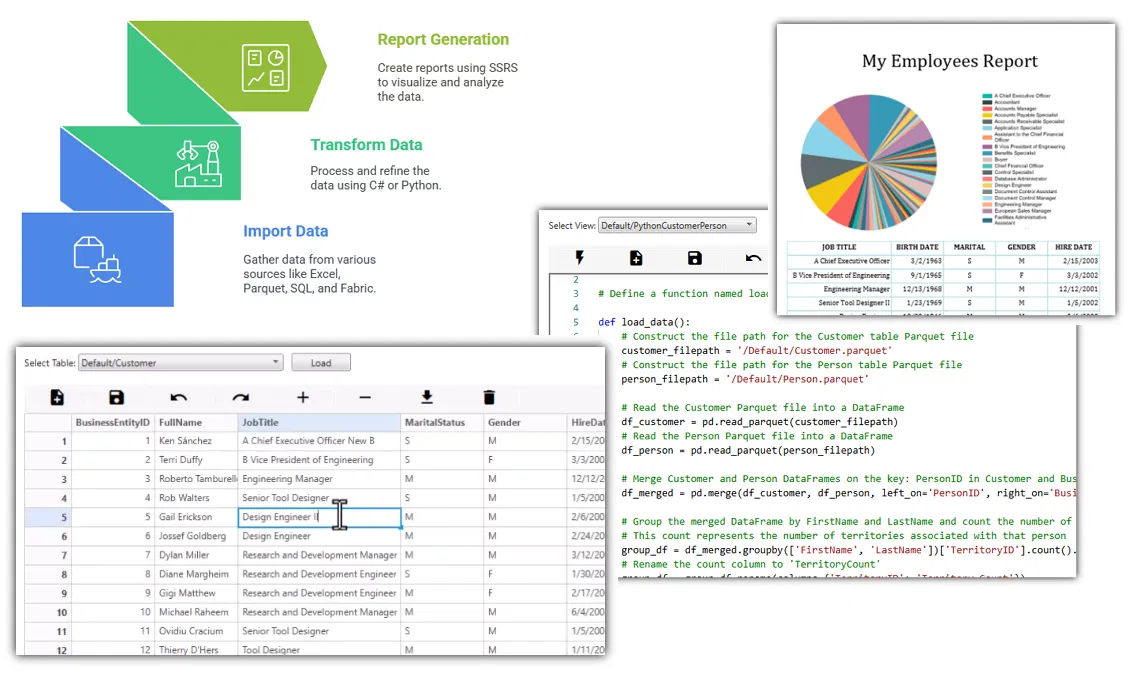
Often, AI capabilities are exaggerated—such as predicting future events. However, AI truly excels at computation. This application allows you to import and transform your data using AI for calculations, and then report and export the outcomes. This is a practical AI implementation that puts your data and its insights firmly in your control.
This application allows you to establish your own Personal Data Warehouse by:
Importing data from:
Excel, CSV, Parquet, SQL Server, Microsoft Fabric Warehouse
Transforming data using AI:
Python and C#
Providing your data structure, questions, and transformations to the AI engine of your choice—either in the cloud or locally.
Exporting data to:
Excel, CSV, Parquet, SQL Server, Microsoft Fabric Warehouse
Standard data warehouses operate in the cloud, incurring compute costs even when simply viewing your data. However, your computer already has adequate CPU and memory resources. Why not utilize them?
This tool enables you to view, modify, and transform data locally, saving costs and granting you full control. Processing data on your own device bypasses unnecessary cloud expenses and improves speed, flexibility, and privacy.
Privacy & Security – Your data remains local, protected by strong security measures.
Powerful Search & Insights – Take advantage of advanced filtering, search capabilities, analytics, and customizable reports.
Flexible Organization – Adjust data types and categories to suit your specific needs.
Import & Export – Easily migrate and share data across various systems.
For those seeking transparency or wanting to contribute, the GitHub repository provides complete access to the codebase. A community forum on GitHub offers support and collaborative troubleshooting.
BlazorData can be accessed through multiple sign-in options, including social logins, making it easy to start using the tool.
New users can quickly get started by downloading the Quick Start guide, with detailed documentation available for exploring advanced functionalities. Regularly updated blog posts provide updates, tips, and insights into development and usage.