
Description
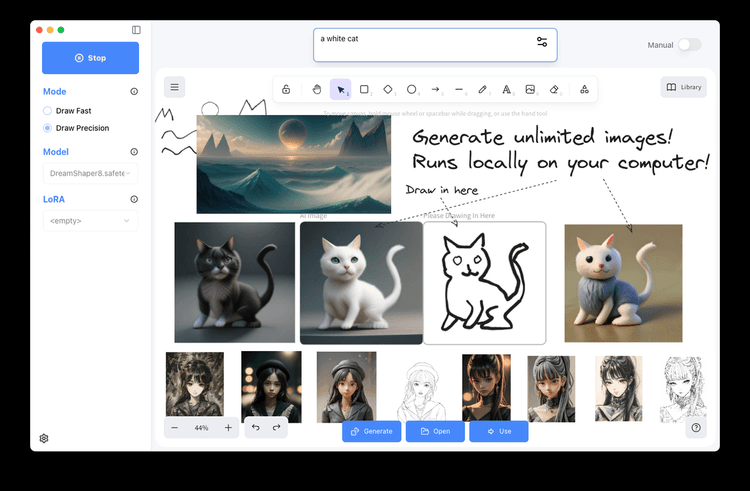
CHARL-E is an accessible AI tool that lets you produce art on your Mac, powered by the Stable Diffusion model. Using CHARL-E, you can create distinctive and visually engaging images by simply typing in a prompt.
This tool removes the hassle of intricate setups or dependencies, offering a fast and simple way to begin. A primary feature includes the option to automatically fetch weights, though users can also choose to use their own.
It also allows setting various parameters like samplers, number of images, seeds, weights, and save locations. Furthermore, CHARL-E lets you see all your creations in a gallery, giving you a convenient way to view and appreciate your generated images. CHARL-E sets itself apart with its ease of use and straightforward design.
It does away with the need for manual installs or command lines, needing only a single click to download and run. Plus, CHARL-E emphasizes privacy and offline use, making sure no data is sent to outside servers. Created by Charlie Holtz, a quantitative finance expert in NYC, CHARL-E seeks to bring the Stable Diffusion model to Mac users.
The tool is actively supported, with future updates expected to boost its performance and compatibility. Stay updated on the latest by subscribing to the newsletter on the website. You can download CHARL-E for free, enjoying a smooth and direct way to use AI to make art on your Mac.
Pricing Plans
Releases
Reviews
Pros & Cons
Pros
Simple interface
Uses Stable Diffusion model
Automatically downloads weights
Cons
Mac-only
No command-line access
Manual weight input needed