Ctrl/




An automated filing system for your Google Drive using artificial intelligence.
Input:
Output:
Updated: May 31, 2026 Free + from $6/month
Description
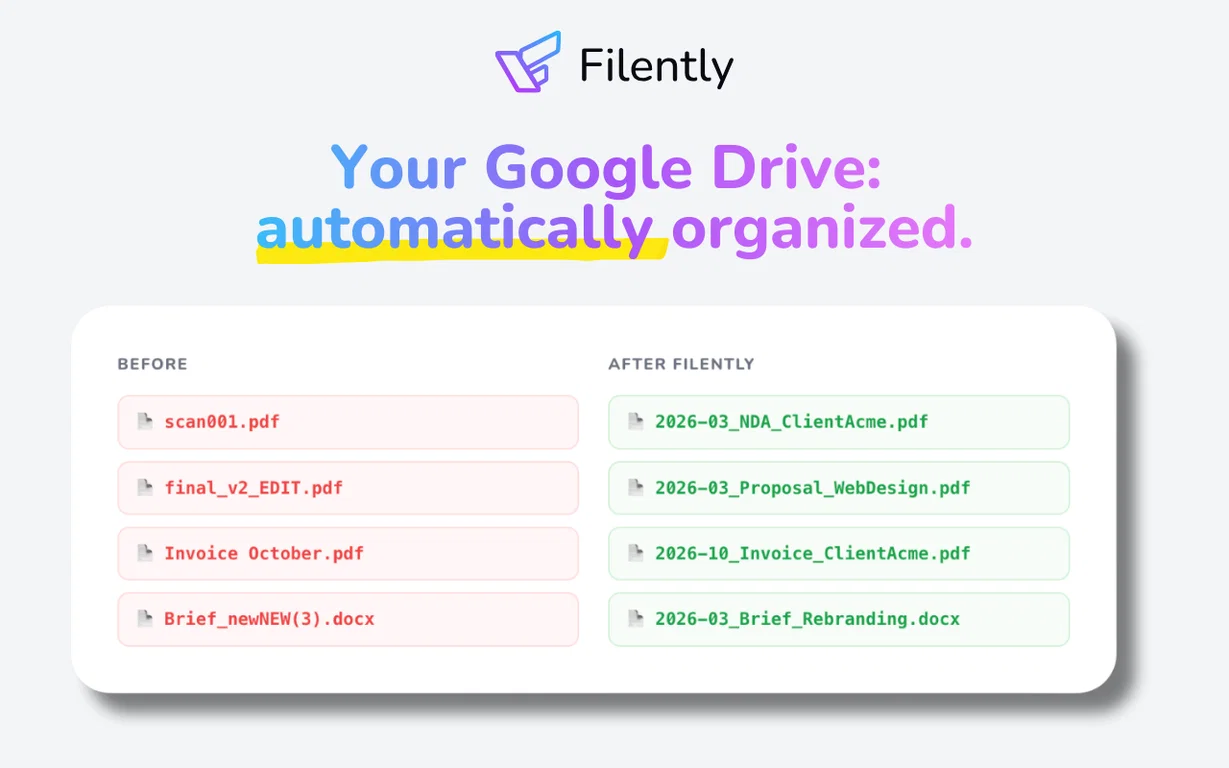
Filently is an intelligent file organizer and automatic file renamer designed for Google Drive. It automatically identifies, renames, and categorizes new documents according to your specified naming conventions and folder structure. This eliminates the need for manual sorting, prompts, or rule configurations.
Instead of spending significant time on folder management and file renaming, Filently applies your naming standards and places every document in its correct location as soon as it arrives. Say goodbye to generic filenames like 'Scan_0147862.pdf' and welcome a streamlined, consistent, and easily searchable Google Drive.
This tool is ideal for freelancers, agencies, and small businesses overwhelmed by document management. If your Google Drive resembles a chaotic archive of unsorted files, Filently is the solution.
Filently integrates directly with your existing Google Drive, working with your current folder hierarchy or assisting in the creation of a new, organized structure. Your files remain within Google Drive, avoiding migration complexities and vendor lock-in.
It supports various formats including PDF, Microsoft Office, OpenDocument, and images containing text across over 20 languages. Other file types can be organized based on their filenames.
Hosted in Switzerland and the EU, with a strong emphasis on user data privacy. Your information is never utilized for AI training. Support for Dropbox, OneDrive, and other platforms is anticipated soon.
Instead of spending significant time on folder management and file renaming, Filently applies your naming standards and places every document in its correct location as soon as it arrives. Say goodbye to generic filenames like 'Scan_0147862.pdf' and welcome a streamlined, consistent, and easily searchable Google Drive.
This tool is ideal for freelancers, agencies, and small businesses overwhelmed by document management. If your Google Drive resembles a chaotic archive of unsorted files, Filently is the solution.
Filently integrates directly with your existing Google Drive, working with your current folder hierarchy or assisting in the creation of a new, organized structure. Your files remain within Google Drive, avoiding migration complexities and vendor lock-in.
It supports various formats including PDF, Microsoft Office, OpenDocument, and images containing text across over 20 languages. Other file types can be organized based on their filenames.
Hosted in Switzerland and the EU, with a strong emphasis on user data privacy. Your information is never utilized for AI training. Support for Dropbox, OneDrive, and other platforms is anticipated soon.
Key Features
Automated File Renaming
AI Document Identification
Automated Folder Routing
Custom Naming Conventions
Intelligent Folder Structure Creation
Pricing Plans
Model
freemium
Packages
1 Package
Price Start From
$6/month
Payment Model
monthly
Model
freemium
Packages
1 Package
Price Start From
$6/month
Payment Model
monthly
Releases
Initial release of Filently.
Reviews
Pros & Cons
Pros
Operates within Google Drive, eliminating the need to learn a new application.
No data migration is necessary.
Automatically learns your existing folder structure.
Cons
Currently only compatible with Google Drive.
Requires a Google account.
No desktop or offline version available.