Ctrl/




AI-powered math tool with handwriting support
Input:
Output:
Updated: Dec 9, 2024 Free + from $9.99
Description
Hello to all math lovers, students, and teachers!
Let's be honest for a moment:
Typing math equations on an iPad? Annoying. Switching between countless symbols and keyboards is really INCONVENIENT.
Writing math on paper? Not ideal either.
Of course, paper feels natural, BUT:
- Saving or editing your work easily isn't possible.
- Lose a page? It's gone forever.
- Sharing or getting quick help is difficult.
The struggle is very real.
But what if there was a method to write math just like on paper, but in a smarter way?
Imagine if your handwritten work was:
✅ Digital (no more lost pages).
✅ Editable (mistakes are easily fixed).
✅ Sharable (send, save, and store it easily).
AND… what if you had immediate AI assistance built-in?
Introducing Qonqur..
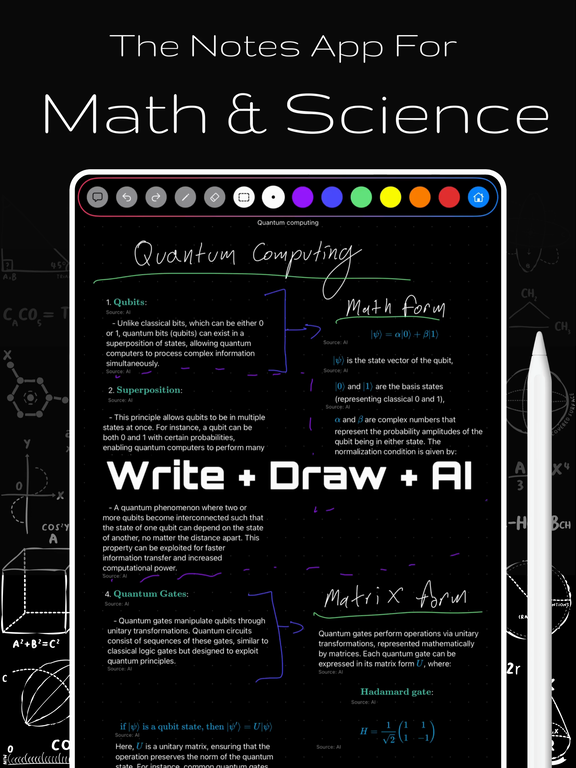
The app that allows you to handwrite math with your Apple Pencil (just like you enjoy doing now)…
PLUS: Chat with AI whenever you require hints, explanations, or solutions.
Picture this:
You're working on a tough calculus problem.
Instead of struggling with a clumsy math keyboard (or over-erasing on paper)…
You simply write.
- As naturally as you would on paper.
- It's saved and easily shared.
- Need help? AI is available to chat.
No more switching between apps. No more mess. No more “Where did I put that paper?” moments.
- Theorem lookup? Done
- Automatic substitutions? Checked
- Work with AI directly on your infinite canvas? Absolutely
This isn't only for students.
For teachers: Eliminate the whiteboard struggle and disorganized stacks of notebooks.
For lifelong learners: Carry your math workspace on your iPad—anytime, anywhere.
So… want to make math smooth, simple, and stress-free?
👉 Join the Wait List now and begin writing math the way it SHOULD be.
No mess. No hassle. Just math—your way.
Let's be honest for a moment:
Typing math equations on an iPad? Annoying. Switching between countless symbols and keyboards is really INCONVENIENT.
Writing math on paper? Not ideal either.
Of course, paper feels natural, BUT:
- Saving or editing your work easily isn't possible.
- Lose a page? It's gone forever.
- Sharing or getting quick help is difficult.
The struggle is very real.
But what if there was a method to write math just like on paper, but in a smarter way?
Imagine if your handwritten work was:
✅ Digital (no more lost pages).
✅ Editable (mistakes are easily fixed).
✅ Sharable (send, save, and store it easily).
AND… what if you had immediate AI assistance built-in?
Introducing Qonqur..
The app that allows you to handwrite math with your Apple Pencil (just like you enjoy doing now)…
PLUS: Chat with AI whenever you require hints, explanations, or solutions.
Picture this:
You're working on a tough calculus problem.
Instead of struggling with a clumsy math keyboard (or over-erasing on paper)…
You simply write.
- As naturally as you would on paper.
- It's saved and easily shared.
- Need help? AI is available to chat.
No more switching between apps. No more mess. No more “Where did I put that paper?” moments.
- Theorem lookup? Done
- Automatic substitutions? Checked
- Work with AI directly on your infinite canvas? Absolutely
This isn't only for students.
For teachers: Eliminate the whiteboard struggle and disorganized stacks of notebooks.
For lifelong learners: Carry your math workspace on your iPad—anytime, anywhere.
So… want to make math smooth, simple, and stress-free?
👉 Join the Wait List now and begin writing math the way it SHOULD be.
No mess. No hassle. Just math—your way.
Pricing Plans
Model
freemium
Packages
1 Package
Price Start From
$9.99
Payment Model
Not specified
Model
freemium
Packages
1 Package
Price Start From
$9.99
Payment Model
Not specified
Releases
Focused on making advanced math easier for users with tablets like iPad and Pencil.
Reviews
Pros & Cons
Pros
Gesture recognition functionality
Real-time mirroring of movement
Interaction with virtual hands
Cons
Limitations in gesture recognition
PDF navigation might not be perfect
Potential bias in STEM-related content