Ctrl/




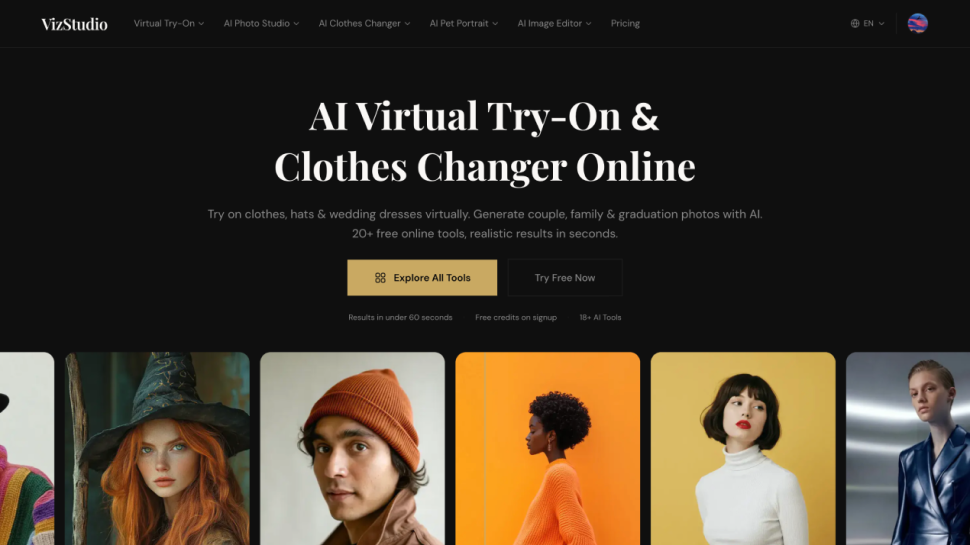
VizStudio is a free AI virtual try-on platform with 18+ tools to change clothes, preview outfits, and generate realistic photos in seconds
Input:
Output:
Updated: Mar 18, 2026 Free + from 4.9
Description
Ever wished you could see how an outfit looks on you before buying it online? VizStudio makes that possible. It's a free, browser-based AI platform that lets you virtually try on clothes, swap outfits in any photo, and generate realistic images — all without downloading an app or learning Photoshop.
## **What You Can Do with VizStudio**
At its core, VizStudio is an AI clothes changer. Upload a photo of yourself and an image of any outfit, and the AI generates a realistic composite in under 60 seconds. The result isn't a crude cutout pasted onto your body — the AI matches lighting, adjusts shadows, and preserves your skin tone and facial features so the final image looks like a real photograph.
But clothes swapping is just the starting point. VizStudio bundles over 18 AI-powered tools into a single platform, covering virtually every type of photo you might need:
**Virtual Try-On Tools** — Preview hats, shoes, rings, engagement rings, wedding dresses, and even new hair colors on your own photo. The wedding dress try-on is especially useful for brides narrowing down silhouettes before booking salon appointments, while the ring try-on helps couples preview engagement rings on their actual hands before making that big purchase.
**AI Photo Generation** — Create couple photos, wedding portraits, family portraits, pet portraits, graduation photos, and holiday cards from simple selfies. Upload individual photos and the AI combines them into natural-looking group shots.
**Image Editing Tools** — A multi-model AI image editor powered by Flux 1.1 Pro, GPT-4o, Grok Imagine, and more. Edit photos with text prompts, change backgrounds, enhance quality, or recolor existing clothing without touching the rest of the image. Plus a one-click background remover that produces clean transparent PNGs ready for ecommerce listings or social media.
## **Who Is It For?**
VizStudio sits at the intersection of fashion tech and AI image generation, which makes it useful for a surprisingly wide range of people.
**Online shoppers** use the virtual try-on to preview outfits before buying — reducing returns and boosting confidence in their purchases. **Ecommerce sellers** use the clothes changer and background remover to create product photos without expensive photoshoots. **Content creators** generate outfit variations for social media without buying new clothes for every post. And **couples planning a wedding** use the dress try-on, ring preview, and wedding photo generator to visualize their big day before committing to vendors.
The common thread is that VizStudio replaces workflows that used to require either professional tools (Photoshop, studio lighting) or expensive services (photographers, stylists) with a simple upload-and-generate process that anyone can use.
## **Pricing That Makes Sense**
Unlike most AI tools that lock you into monthly subscriptions, VizStudio uses a credit-based model. You buy credits when you need them, spend them across any of the 18+ tools, and they stay valid for a full year. No recurring charges, no forgetting to cancel.
New users get free credits on signup — no credit card required. Paid plans start at just $4.90 for 100 credits, with each generation costing 2–6 credits depending on the tool and resolution. Every plan includes commercial use rights and watermark-free output, so you own what you create.
If a generation fails or produces an unusable result, your credits are automatically refunded. It's a small detail, but it means you're only paying for results you actually use.
## **Why VizStudio Over Other AI Tools?**
The AI virtual try-on space is getting crowded, so what makes VizStudio different?
First, **breadth**. Most competitors do one thing — clothes swapping or background removal. VizStudio consolidates 18+ tools under one account with a shared credit pool. Instead of juggling five separate subscriptions, you get everything in one place.
Second, **output quality**. The AI handles the details that usually expose generated images as fake: lighting direction, shadow consistency, fabric texture, skin tone preservation. The results look like real photos, not AI composites.
Third, **accessibility**. Everything runs in the browser. No app downloads, no GPU requirements, no design skills needed. Upload your photos, click generate, download the result. It works on desktop and mobile, and supports English, Chinese, Japanese, and Korean.
VizStudio is free to start at [vizstudio.art](http://vizstudio.art) — upload a photo and see the results for yourself.
Pricing Plans
Model
freemium
Packages
1 Package
Price Start From
4.9
Payment Model
Not specified
Model
freemium
Packages
1 Package
Price Start From
4.9
Payment Model
Not specified
Releases
VizStudio is a free AI virtual try-on platform with 18+ tools to change clothes, preview outfits, and generate realistic photos in seconds — no download needed.
Reviews
Pros & Cons
Pros
18+ AI tools in one platform — no need to juggle multiple subscriptions
Realistic output with accurate lighting, shadow, and skin tone matching
Watermark-free output with full commercial use rights on all plans
Cons
Only 2 free credits on signup — limited for evaluating all 18+ tools
Google login only — no email or other social login options
No mobile app — browser-only experience